
Wind 支付接入说明
Wind 支付接入说明
1. 开启 Wind 服务
参考 Wind 示例教程 开启 Wind 服务。
2. 选择平台
参考 Wind 客户端SDK接入指南 接入 WindSDK 并切换到对应的平台。
3. 支付说明文档
根据所选择的平台,查阅支付相关功能说明文档。
4. 支付模式
支付分为 充值游戏币购买 和 道具直购 两种模式(快手不支持道具直购模式)。具体说明参见各平台相关说明:
5. 游戏币充值购买流程
5.1 创建订单
调用 WindSDK 中的 CreateOrder 方法来创建订单:
示例程序
public static async Task<CreateOrderResult> CreateOrder(int totalAmount, int goodType, string personaId, string productId,
            string outTradeNo, string offerId, string zoneId, int goodsPrice, string attach)
{
    return await UOSWindService.Platform.CreateOrder(new CreateOrderRequest
    {
        // (必填) 扣除游戏币的数量
        totalAmount = totalAmount,
        // (选填) 订单商品类型(1.游戏币 2.道具直购)
        goodType = goodType,
        // (必填) 通过code2Session云函数得到的用户唯一标识ID
        personaId = personaId,
        // (道具直购必填) 道具ID
        productId = productId,
        // (必填) 自定义订单号
        outTradeNo = outTradeNo,
        // (道具直购必填) 支付应用ID
        offerId = offerId,
        // (道具直购必填) 分区ID
        zoneId = zoneId,
        // (道具直购必填) 道具单价(单位: 分)
        goodsPrice = goodsPrice,
        // (选填) 透传数据,在通知发货时会作为参数传递
        attach = attach
    });
}
返回参数
public class CreateOrderResult
{
    // 状态码 200表示订单创建成功
    public int statusCode;
    // (微信快手道具直购模式返回) 支付原串
    public string signData;
    // (微信快手道具直购模式返回) 支付签名
    public string paySig;
    // (微信快手道具直购模式返回) 用户态签名
    public string signature;
}
5.2 发起充值
调用 WindSDK 的 RequestPayment 方法来发起充值:
示例程序
public static void RequestPayment(string paySig, string offerId, int buyQuantity,
    string outTradeNo, string os, string zoneId)
{
    UOSWindService.Platform.RequestPayment(new RequestPaymentOption
    {
        // (快手平台必填) 支付签名
        paySig = paySig,
        // (微信平台必填) 支付应用ID
        offerId = offerId,
        // (必填) 购买游戏币的数量
        buyQuantity = buyQuantity,
        // (必填) 自定义订单号
        outTradeNo = outTradeNo,
        // (抖音平台必填) 操作系统("android", "ios")
        os = os,
        // (选填) 分区ID
        zoneId = zoneId,
        // (选填) 调用成功回调
        success = resp =>
        {
            Debug.Log("Request payment success.");
        },
        // (选填) 调用失败回调
        fail = resp =>
        {
            Debug.Log("Request payment failed, errMsg: " + resp.errMsg);
        },
        // (选填) 调用完成回调
        complete = resp =>
        {
            Debug.Log("Request payment completed, errMsg: " + resp.errMsg);
        }
    });
}
5.3 支付订单
充值成功后需要调用 WindSDK 中的 OrderPay 方法来支付订单,具体说明参见各平台相关说明:
示例程序
3. public static async Task<OrderPayResult> OrderPay(int totalAmount, string personaId, string outTradeNo)
{
    return await UOSWindService.Platform.OrderPay(new OrderPayRequest
    {
        // (必填) 扣除游戏币的数量
        totalAmount = totalAmount,
        // (必填) 通过code2Session云函数得到的用户唯一标识ID
        personaId = personaId,
        // (必填) 自定义订单号
        outTradeNo = outTradeNo
    });
}
返回参数
public class OrderPayResult
{
    // 状态码 200表示订单支付成功
    public int statusCode;
    // 错误信息 状态码等于200时为空
    public string errMsg;
}
6. 道具直购支付流程(微信篇)
6.1 准备工作
在部署 Wind 服务端时,需要填入 微信支付appKey 和 支付成功通知url;
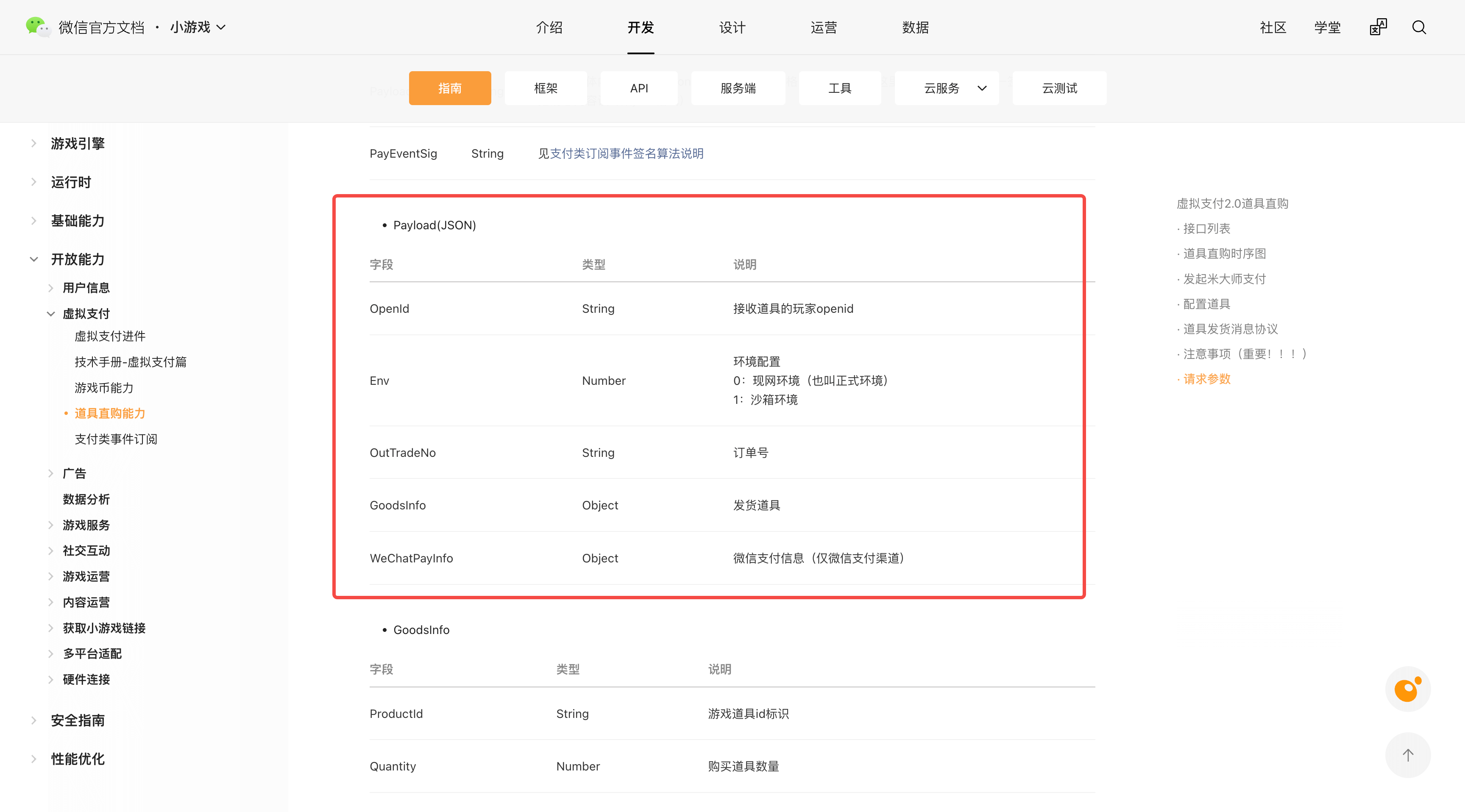
在"mp-支付基础配置"中查找appKey,开发者需要实现支付成功的api,并将api的url填入支付成功通知url,api的参数格式为发货推送中的Payload字段,请参阅 微信相关文档;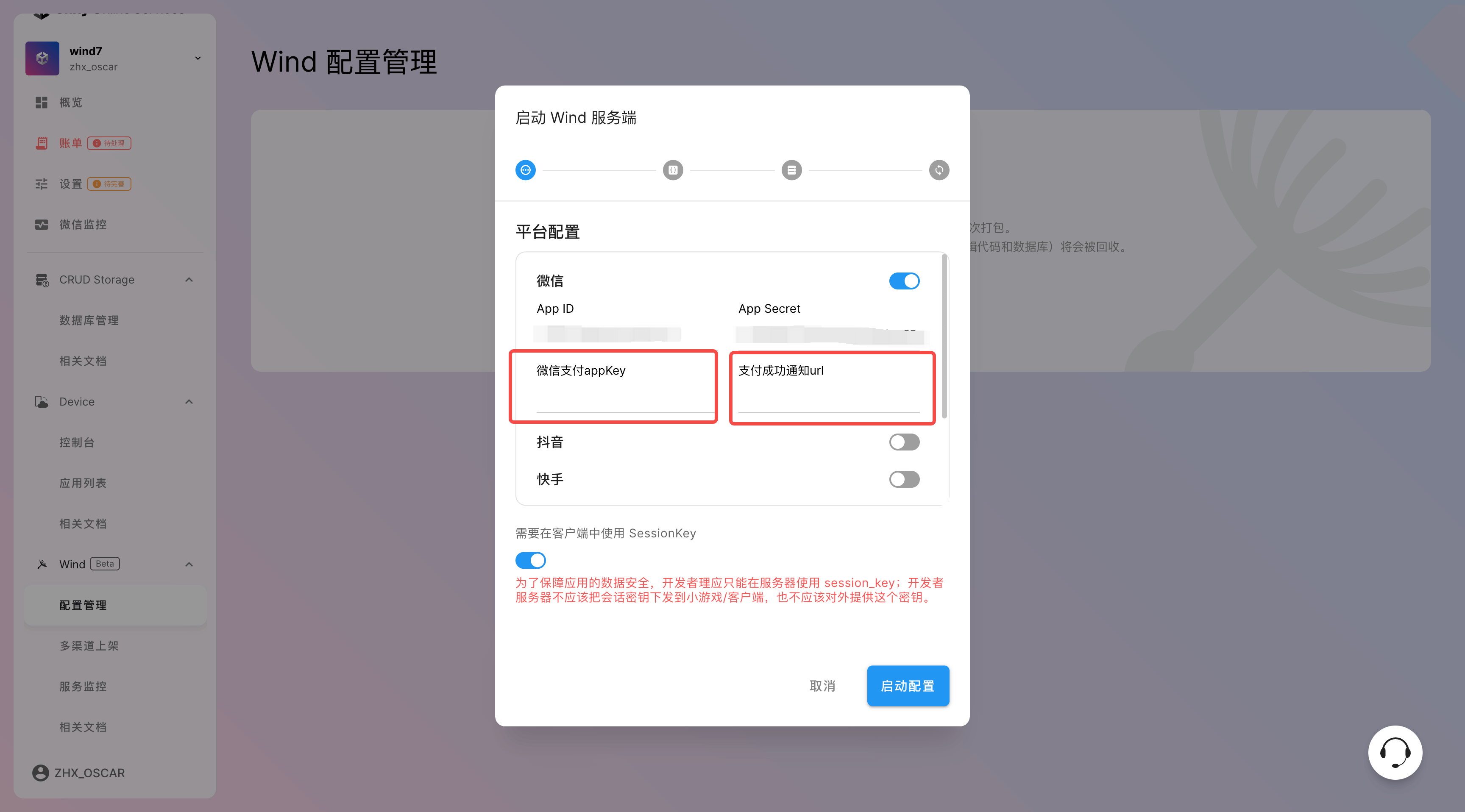
6.2 填写 URL
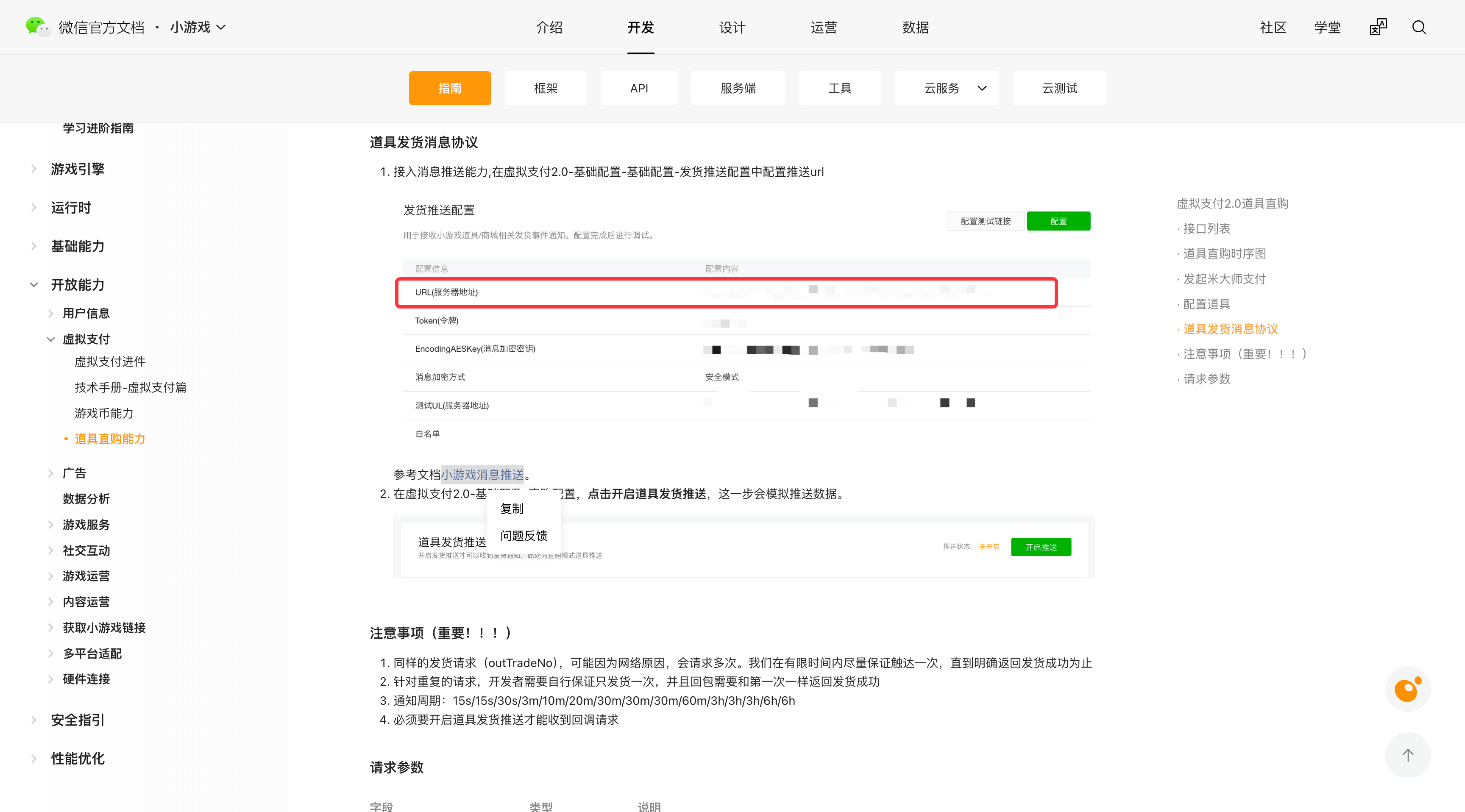
微信平台需要将 wxPayNotify 的url填入微信小游戏控制台中的虚拟支付2.0 → 基本配置 → 基础配置 → 发货推送配置 → 配置推送url,请参阅 微信相关文档。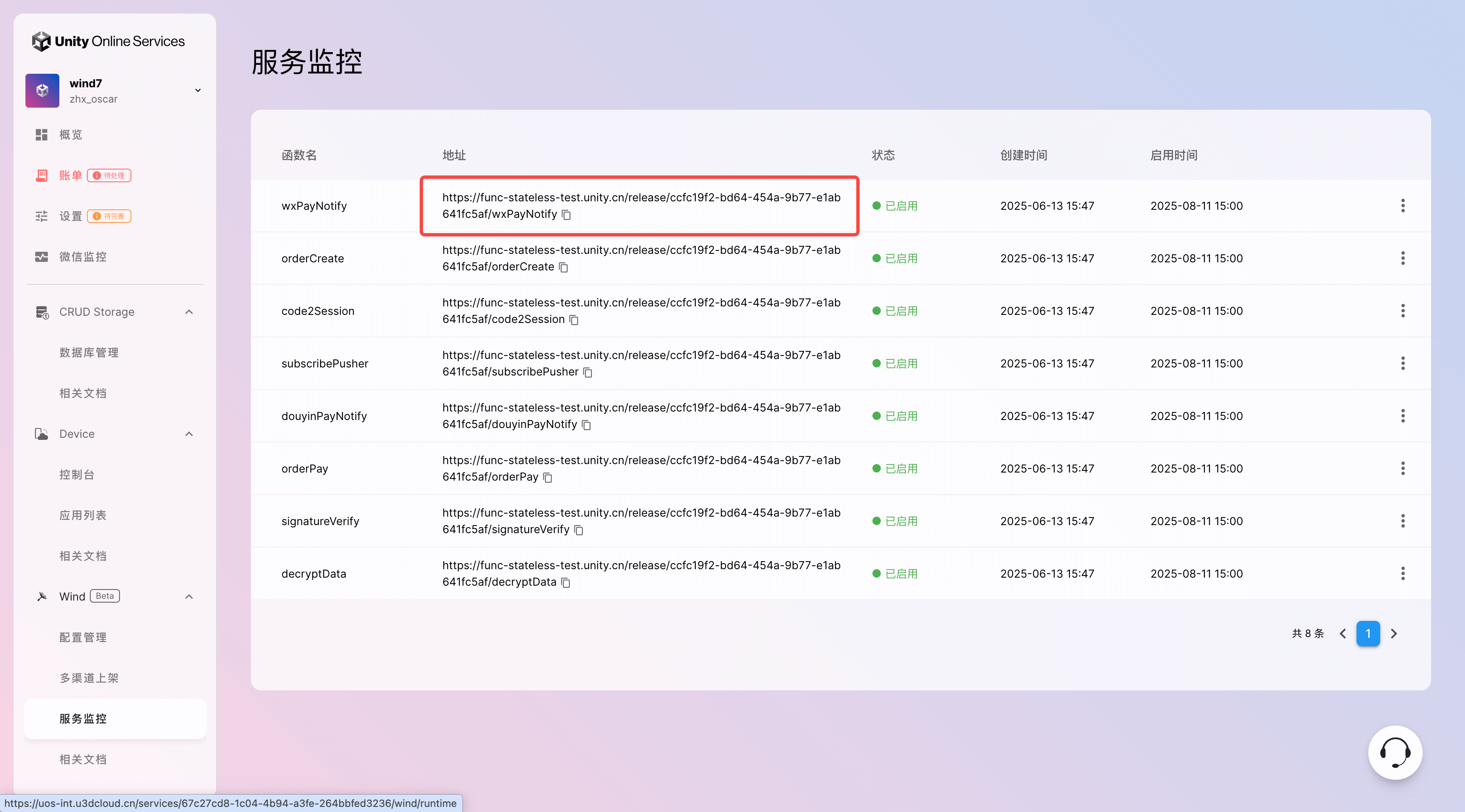
6.3 创建订单
调用 WindSDK 中的 CreateOrder 方法来创建订单(示例程序同游戏币支付订单)。
6.4 发起直购
调用 WindSDK 的 RequestPaymentGameItem 方法来发起道具直购:
public static void RequestPaymentGameItem(string signData, string paySig, string signature,
    string os, string zoneId, string outTradeNo, int orderAmount, string goodName)
{
    UOSWindService.Platform.RequestPaymentGameItem(new RequestPaymentGameItemOption
    {
        // (微信平台必填) 支付签名
        paySig = paySig,
        // (微信平台必填) 支付原串
        signData = signData,
        // (微信平台必填) 用户态签名
        signature = signature,
        // (抖音平台必填) 操作系统("android", "ios")
        os = os,
        // (选填) 分区ID
        zoneId = zoneId,
        // (抖音平台必填) 自定义订单号
        outTradeNo = outTradeNo,
        // (抖音平台必填) 道具单价(单位: 分)
        orderAmount = orderAmount,
        // (选填) 道具名称
        goodName = goodName,
        // (选填) 调用成功回调
        success = resp =>
        {
            Debug.Log("Request payment game item success.");
        },
        // (选填) 调用失败回调
        fail = resp =>
        {
            Debug.Log("Request payment game item failed, errMsg: " + resp.errMsg);
        },
        // (选填) 调用完成回调
        complete = resp =>
        {
            Debug.Log("Request payment game item completed, errMsg: " + resp.errMsg);
        }
    });
}
7. 道具直购支付流程(抖音篇)
7.1 准备工作
在部署 Wind 服务端时,需要填入 服务器回调token 和 支付成功通知url;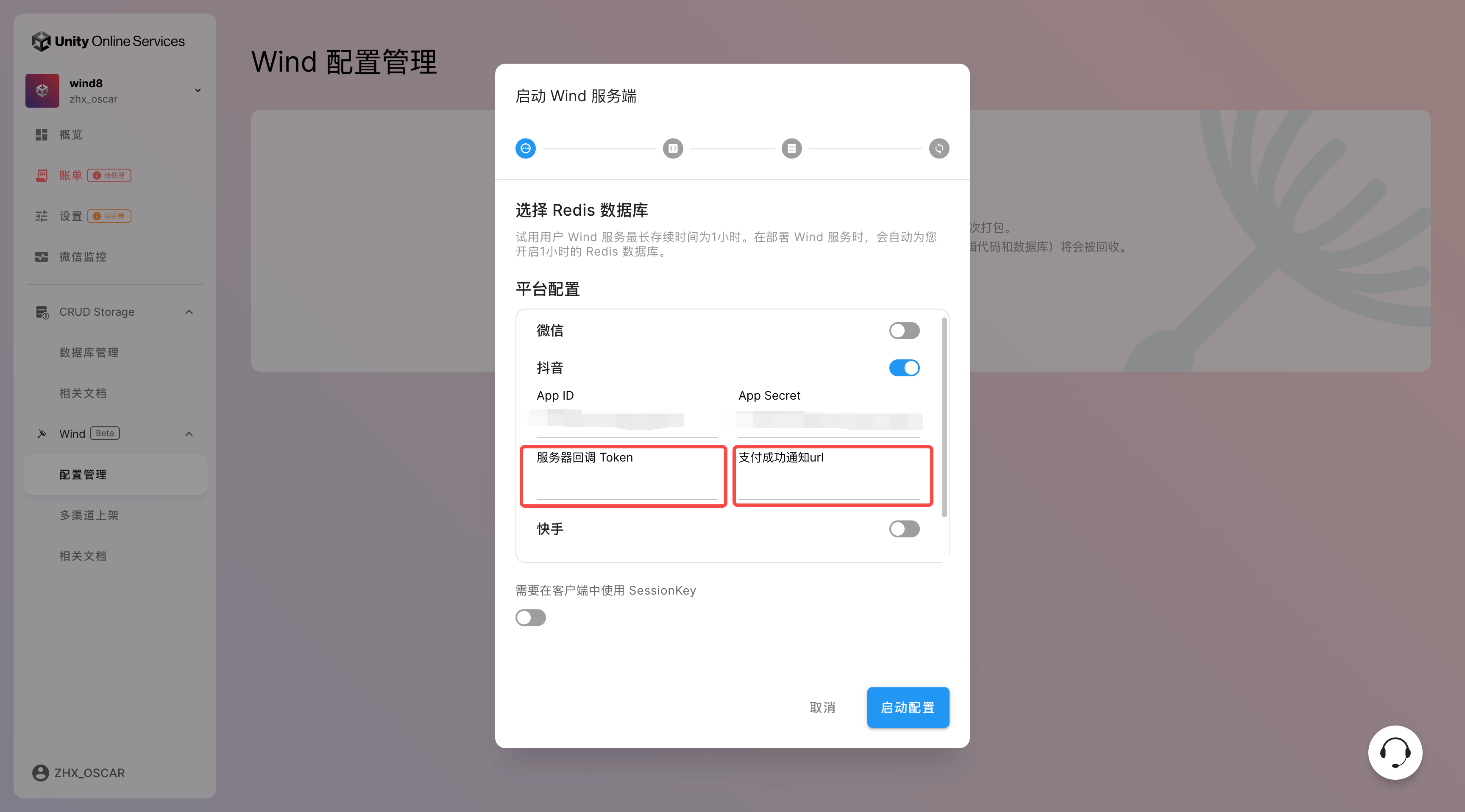
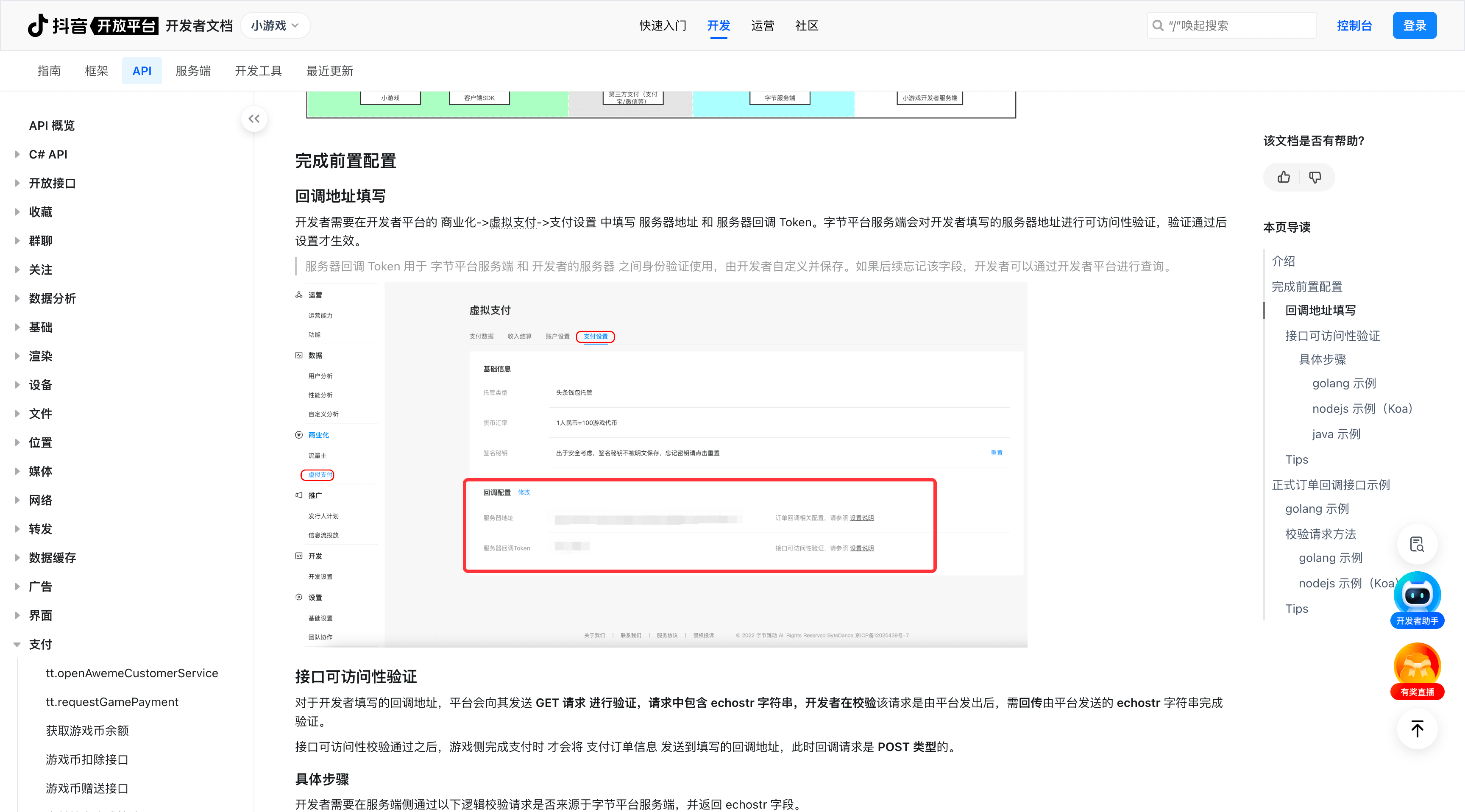
服务器回调token 由开发者自定义,同时开发者需要实现支付成功的api,并将api的url填入支付成功通知url,api的参数格式如下所示:
type OrderSuccessPayInfo struct {
    Appid          string    `json:"appid"`            // 小游戏appid
    CpOrderNo      string    `json:"cp_orderno"`       // 开发者自定义订单号
    CpExtra        string    `json:"cp_extra"`         // 开发者传的额外参数
    OrderNoChannel string    `json:"order_no_channel"` // 小游戏后台交易单号
    Amount         int64     `json:"amount_cent"`      // 订单金额,单位人民币分
    BuyQuantity    int64     `json:"amount_coin"`      // 购买游戏币数量
    Currency       string    `json:"currency"`         // 支付币种,CNY 人民币,DIAMOND 钻石
}

type OrderInfo struct {
   Timestamp    string `json:"timestamp"`    // 时间戳
   Nonce        string `json:"nonce"`        // 随机数
   Msg          string `json:"msg"`          // 包体
   Signature    string `json:"signature"`    // 根据token生成的签名
}
7.2 填写 URL
将 douyinPayNotify 的url填入抖音小游戏控制台中的商业化→虚拟支付→支付设置中配置推送url,请参 阅抖音相关文档。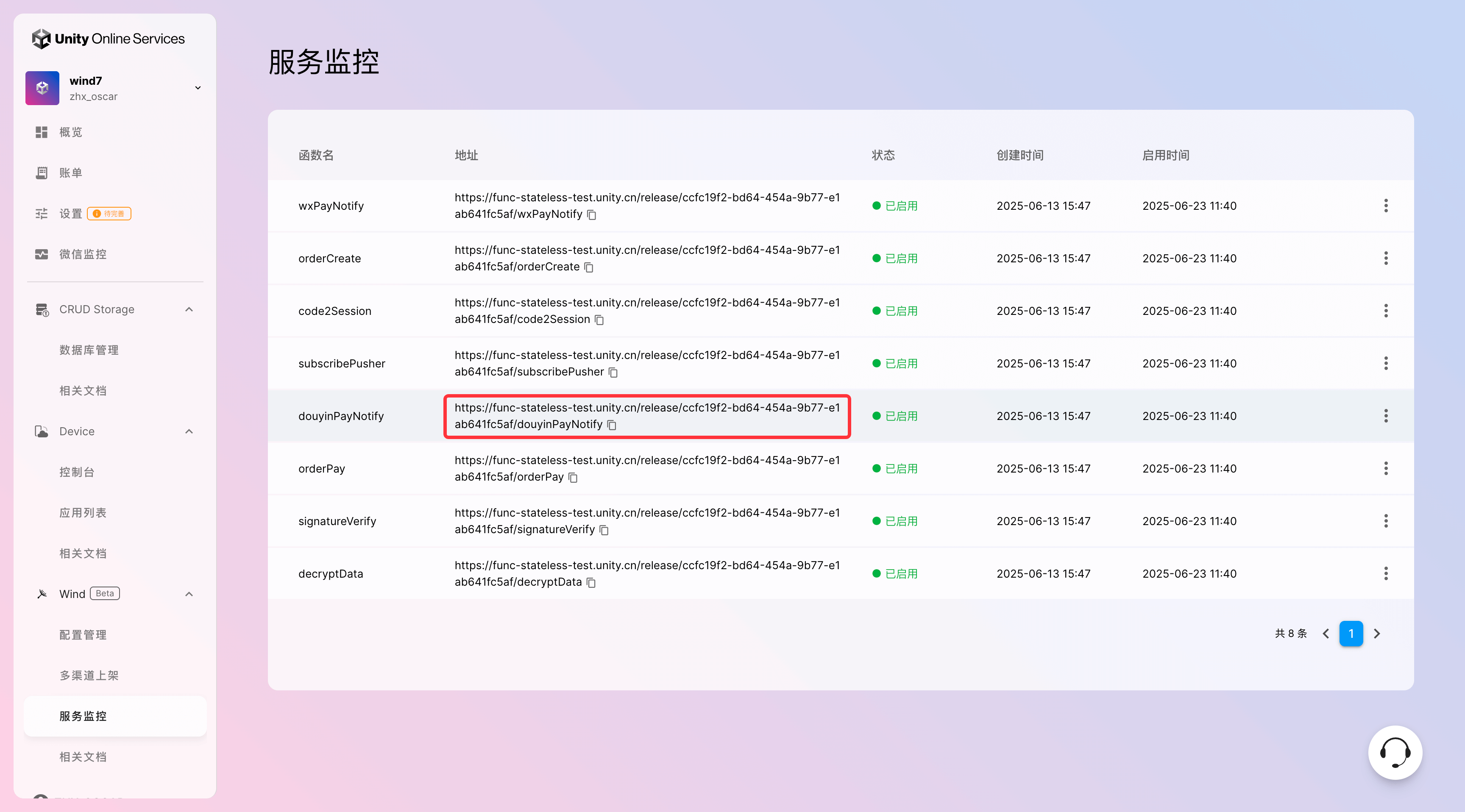
7.3 创建订单
调用 WindSDK 中的 CreateOrder 方法来创建订单(示例程序同游戏币支付订单)。
7.4 发起直购
调用 WindSDK 的 RequestPaymentGameItem 方法来发起道具直购(示例程序见微信道具直购)。