
Wind 客户端SDK接入指南
Wind 客户端SDK接入指南
1. 开启 Wind
参考 Wind 示例教程,开启 Wind 服务并完成服务端部署。
2. 安装配置 UOS Launcher
参考 Launcher 教程,安装 Launcher 后,关联 UOS APP,安装 Wind SDK。
注意: 请务必确认在进行后续教程之前,已经成功完成了 Launcher 教程的安装步骤,否则可能导致后续接入无法顺利进行。
3. 安装集成平台SDK
根据要集成的平台(微信、抖⾳、快⼿)安装对应的SDK:
微信
在 Unity Editor 菜单栏中打开 「Window -> Package Manager」,点击左上角的 「+」,选择 「Add package from git URL」,输入 WeiXin SDK 的 git 地址如下,点击 「Add」 等待安装完成。https://github.com/wechat-miniprogram/minigame-tuanjie-transform-sdk.git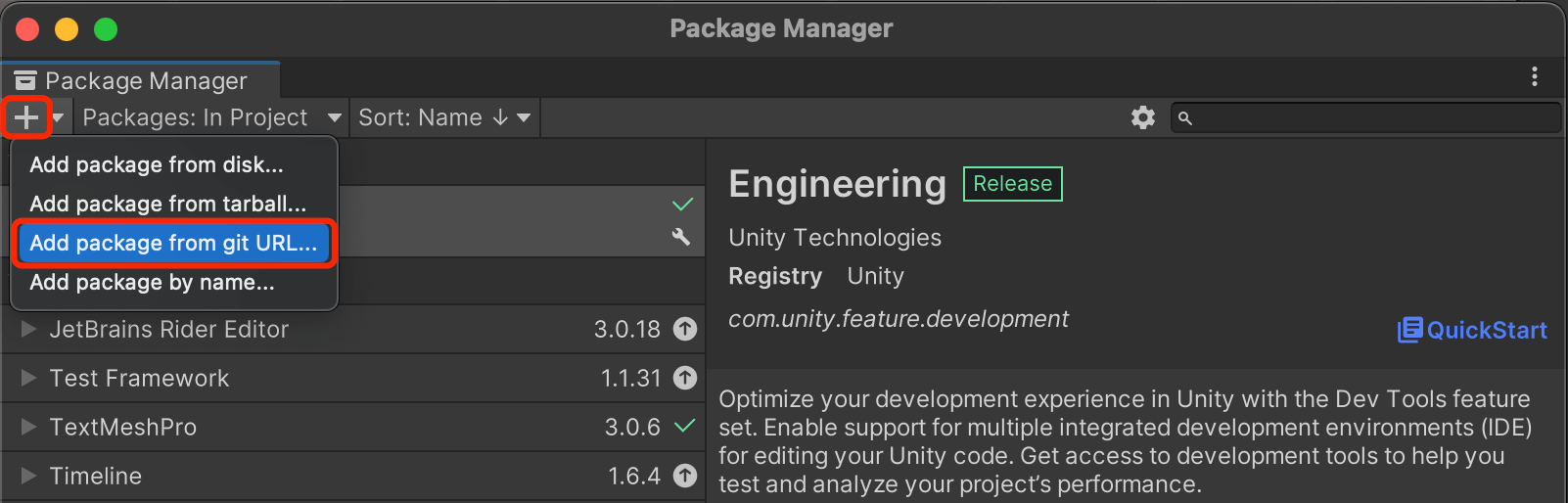
抖⾳
参考 安装 TTSDK教程,下载并导入 BGDT Package 后安装 TTSDK 包。快手
打开游戏工程,在 Unity/团结引擎 Editor 菜单栏中打开 「Window -> Package Manager」,点击左上角的 「+」,选择 「Add package from git URL」,输入https://github.com/ksminigame/minigame-tuanjie-transform-sdk.git,点击 「Add」 等待安装完成。Unity/团结 小游戏宿主
在 Unity Editor 菜单栏中打开 「Window -> Package Manager」,点击左上角的 「+」 按钮,选择 「Add package by name」,输入包名称cn.tuanjie.minihost,点击 「Add」 等待安装完成。 具体资料参考 Unity/团结小游戏宿主适配方案
4. 接入 Wind SDK
// 初始化 Wind SDK
IPlatformAPI _platform = await UOSWindService.InitializeAsync();
// 调用 Wind SDK 方法
var systemInfo = _platform.GetSystemInfo();

//// 或者也可以使用以下方式使用 Wind SDK
// 初始化 Wind SDK
// await UOSWindService.InitializeAsync();
// 调用 Wind SDK 方法
// var systemInfo = UOSWindService.Platform.GetSystemInfo();
5. 核心类和接口
详见 WindSDK PlatformAPI 定义。
6. 添加宏定义
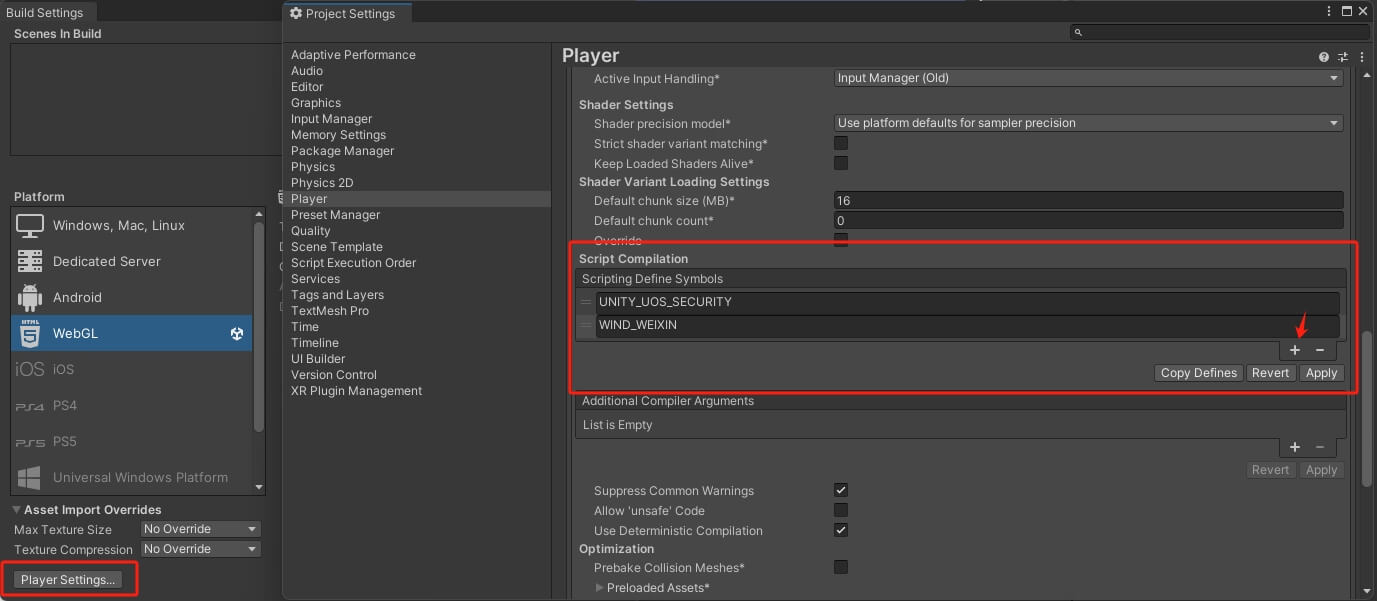
在 Build 之前需要添加指定对应平台的 Scripting Define Symbols.
点击 「File -> Build Settings...」 打开 Build 设置面板,点击左下角 「Player Settings...」 下拉找到 Scripting Define Symbols 并点击 「+」 将对应平台的宏添加入其中。
- 微信:WIND_WEIXIN
- 抖音:WIND_DOUYIN
- 快手:WIND_KUAISHOU
- Unity/团结 小游戏宿主: WIND_MINIHOST
7. 示例程序
using System;
using UnityEngine;
using UOSWind.Model.Lifecycle;
using UOSWind.Model.Account;
using TMPro;

public class UOSWindDemo : MonoBehaviour
{
    private string logText = "";
    public TextMeshProUGUI logTextUI;
    private string code;

    private void Start()
    {
        InitializeSDKAsync();
    }
    /// <summary>
    /// 初始化 WindSDK
    /// </summary>
    private async void InitializeSDKAsync()
    {
        try
        {
            Debug.Log("Initializing Wind SDK...");
            await UOSWindService.InitializeAsync();
            Debug.Log("Wind SDK initialized successfully");
        }
        catch (Exception ex)
        {
            Debug.LogError($"SDK initialization failed: {ex.Message}");
        }
    }

    /// <summary>
    /// 当点击场景中的 UI 按钮(GetSystemInfo)时响应的方法
    /// </summary>
    public void OnClickGetSystemInfoButton()
    {
        // 调用 Wind SDK 方法
        var systemInfo = UOSWindService.Platform.GetSystemInfo();
        Debug.Log("Brand:" + systemInfo.brand);
        Debug.Log("Model:" + systemInfo.model);
        Debug.Log("Platform:" + systemInfo.platform);
        Debug.Log("System:" + systemInfo.system);
    }

    /// <summary>
    /// 当点击场景中的 UI 按钮(Login)时响应的方法
    /// </summary>
    public void OnClickLoginButton()
    {
        UOSWindService.Platform.Login(new LoginOption()
        {
            success = resp =>
            {
                Debug.Log("Login success!");
                Debug.Log("code:" + resp.code);
                Debug.Log("anonymousCode:" + resp.anonymousCode);
                Debug.Log("isLogin:" + resp.isLogin);

                // for kuaishou
                if (!String.IsNullOrEmpty(resp.errMsg))
                {
                    Debug.Log("Msg:" + resp.errMsg);
                }
                code = resp.code;
            },
            fail = resp =>
            {
                Debug.Log("Login fail");
                // for kuaishou
                if (!String.IsNullOrEmpty(resp.errMsg))
                {
                    Debug.Log("ErrMsg:" + resp.errMsg);
                }
                if (!String.IsNullOrEmpty(resp.callbackId))
                {
                    Debug.Log("CallbackId:" + resp.callbackId);
                }
            }
        });
    }

    /// <summary>
    /// 当点击场景中的 UI 按钮(Code2Session)时响应的方法
    /// </summary>
    public void OnClickCode2SessionButton()
    {
        Code2Session();
    }

    private async void Code2Session()
    {
        var resp = await UOSWindService.Platform.Code2Session(code);
        Debug.Log("Code2Session Success");
        Debug.Log("SessionKey:" + resp.sessionKey);
        Debug.Log("OpenId:" + resp.openId);
        Debug.Log("UnionId:" + resp.unionId);
    }

    void OnEnable()
    {
        // 订阅Unity的日志回调
        Application.logMessageReceived += HandleLog;
    }

    void OnDisable()
    {
        // 取消订阅Unity的日志回调
        Application.logMessageReceived -= HandleLog;
    }

    void HandleLog(string logString, string stackTrace, LogType type)
    {
        // 将日志信息添加到logText中
        logText += logString + "
";
        logTextUI.text = logText;
    }
}